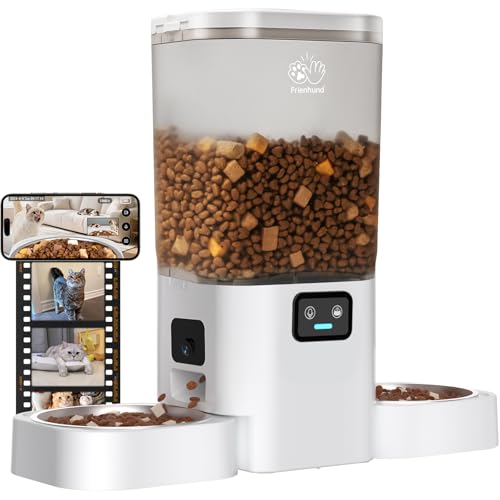
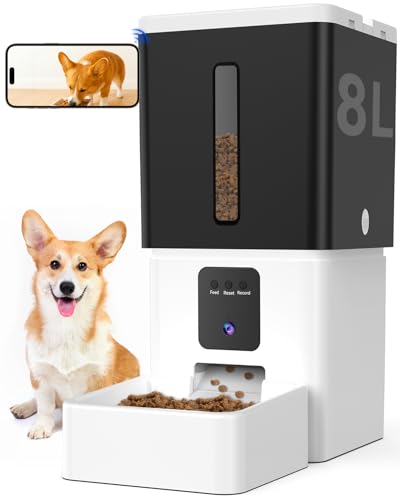
How to Set Up an Automatic Pet Feeder starts with picking a stable, accessible spot near a power outlet. Then you fill the hopper with dry kibble and program the feeding times and portions using the control panel or a connected app. Most models follow the same core steps: unpack, clean the parts, assemble, set the clock, schedule meals, and run a test cycle. Always refer to the manual for your specific feeder, but the general process is consistent across brands.
Choosing the Right Location for Your Feeder
The feeder needs a flat, level surface where your pet can eat without tipping it over. Avoid placing it near heat sources, direct sunlight, or moisture, as these can affect the kibble and electronics. If the feeder is corded, ensure the outlet is within reach and that the cord is tucked away so your pet cannot chew it.
For battery-powered models, choose a spot that stays dry and has good air circulation. A corner of the kitchen or laundry room often works well. Make sure your pet can approach the bowl easily, especially if they are older or have mobility issues.
Preparing the Feeder: Unpacking and Cleaning
Remove all packaging materials and check that all parts are present. Wash the hopper, bowl, and any removable trays with warm soapy water, then rinse and dry thoroughly. This removes manufacturing residues and ensures food safety.
Let everything air dry completely before reassembling. Moisture inside the feeder can cause kibble to clump or mold. If the manual recommends it, wipe the exterior with a damp cloth but avoid getting water into the electronics.
Filling the Hopper Correctly
Only use dry kibble unless the feeder is specifically designed for wet or semi-moist food. Fill the hopper to the recommended maximum line to avoid overfilling, which can cause jams. Do not mix different kibble sizes or add treats, as these can block the dispensing mechanism.
If your feeder has a desiccant pack or moisture absorber, place it in the hopper according to the instructions. This helps keep the food fresh between meals. Always seal the hopper lid tightly to prevent pests or humidity from getting in.
Programming the Feeding Schedule
Set the current time first. Most feeders use a 24-hour format or AM/PM, so double-check the display. Then program each meal time and portion size. Start with the manufacturer’s recommended serving size for your pet’s weight and adjust later based on their appetite and vet advice.
If your feeder connects to a smartphone app, download it and follow the pairing instructions. Many apps allow you to set multiple meals, adjust portions remotely, and view feeding history. Test the schedule by running a manual cycle to ensure the feeder dispenses the correct amount.
Testing and Adjusting the Feeder
Run a complete test cycle after programming. Watch the feeder dispense food into the bowl and check that the portion size matches your setting. If the feeder jams or dispenses too little, inspect the auger or rotating drum for obstructions. Adjust the portion setting if needed.
Observe your pet during the first few meals. Some pets are wary of the noise or movement. If your pet seems anxious, leave the feeder in place but unplugged for a day so they can explore it. Gradually reintroduce the sound by running a manual cycle while they are nearby.
Maintaining Your Automatic Pet Feeder
Clean the feeder every two to four weeks depending on use. Empty the hopper, wipe down all surfaces, and wash removable parts. Check the battery compartment for corrosion if your model uses batteries. Replace batteries at least once a year or when the low-battery indicator appears.
Keep the feeder’s firmware updated if it has app connectivity. Manufacturers release updates to improve reliability and add features. Also inspect the power cord and adapter for wear, and replace them if damaged. A well-maintained feeder can last for several years.
What to Do If Something Goes Wrong
- If the feeder jams, unplug it, remove the kibble, and clean the dispensing mechanism.
- If the time drifts, replace the backup batteries or reset the clock after a power outage.
- If the app won’t connect, restart the feeder and your phone, then re-pair them.
- If the portion size is off, recalibrate using the manual’s instructions.
- If your pet stops eating from the feeder, check for stale food or mechanical noise that might scare them.
Most issues are easy to fix with basic troubleshooting. If your feeder still malfunctions after these steps, consult the manufacturer’s support page or warranty information. For a deeper look at choosing the right feeder for your pet’s needs, explore more articles on our blog.
Frequently Asked Questions
Can I use wet food in an automatic pet feeder?
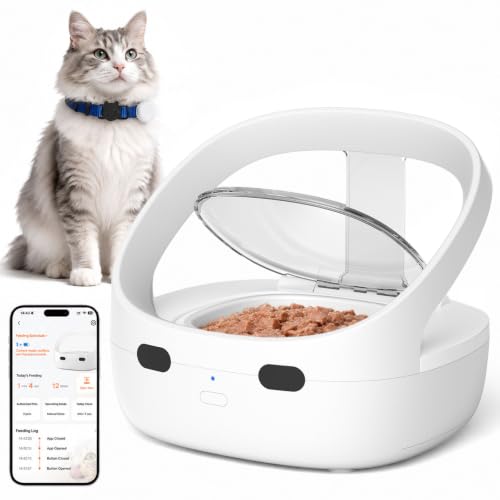
Most automatic feeders are designed for dry kibble only. Wet food can spoil, clog the mechanism, and attract bacteria. If you need to feed wet food, look for a feeder with a cooling compartment or one specifically labeled for wet food.
How do I sync the feeder with my smartphone?
Download the manufacturer’s app, create an account, and follow the in-app pairing steps. Usually you press a button on the feeder to enter pairing mode, then select the device in the app. Ensure Bluetooth or Wi-Fi is enabled on your phone.
What if the feeder jams during a meal?
Unplug the feeder, remove the hopper, and clear any stuck kibble. Check the auger or rotating disc for debris. After cleaning, run a test cycle before the next meal. If jams happen often, try using a uniform kibble size and avoid overfilling.
How often should I clean the feeder?
Clean the hopper and bowl every two weeks. Wipe down the exterior weekly. If your pet has allergies or the feeder is in a dusty area, clean more frequently. Always wash removable parts with warm soapy water and dry thoroughly before reassembly.
Will the feeder work during a power outage?
Battery-powered feeders continue working during an outage. Corded feeders with battery backup will also function for a limited time. Check the manual for backup battery requirements. For extended outages, consider a feeder with a long battery life or a backup power source.
Related Guides
- Best Smart Dog Feeders with WiFi for 2026
- How to Prevent Automatic Feeder Jams
- Can Automatic Feeders Keep Food Fresh
Get Your Feeder Running Smoothly
Setting up an automatic pet feeder takes about 15 minutes, but the payoff is consistent, stress-free meals for your pet. Follow the steps outlined here, and you will avoid most common pitfalls. For more tips on pet care and feeding solutions, browse our blog for additional guides.