You are about to leave for a weekend trip, and the thought of your dog or cat home alone makes your stomach drop. You need a reliable pet camera that offers sharp video, smart alerts, and easy two-way talk. Two names come up again and again: Eufy Security and Petcube. Both brands deliver solid indoor cameras built for pet parents, but they take different approaches to privacy, subscription costs, and AI features. In this guide, we compare three leading models to help you decide which one fits your home and your pet’s needs. For more pet tech comparisons, check out our Comparisons page.
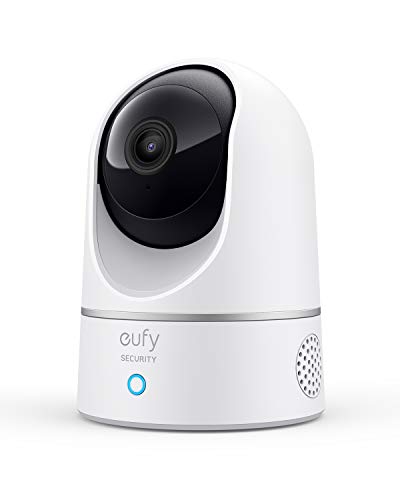
We have assessed the eufy Security Indoor Cam E220, Dog/Pet Camera, the Petcube Cam 360, Wi-Fi Pan-Tilt Pet Security, and the eufy Security 4K Indoor Camera E30. Each offers pan-and-tilt movement, night vision, and two-way audio, but they differ in resolution, AI capabilities, and whether you need a monthly subscription. By the end, you will know which model suits your budget and lifestyle. For a broader look at pet tech, visit our Pet Tech Guides.


Buying Guide: What to Look for in a Pet Camera
Video Quality and Night Vision
A pet camera is useless if you cannot clearly see what your pet is doing. The eufy Security Indoor Cam E220 delivers 2K resolution (1080P when used with HomeKit), while the Petcube Cam 360 offers 1080p HD with 8x zoom. The eufy Security 4K Indoor Camera E30 steps up to true 4K clarity, plus it includes a built-in spotlight for color night vision. If you want the sharpest image day or night, the 4K model is your best bet.
Night vision range also matters. The Petcube Cam 360 can see up to 30 feet in the dark, and both Eufy cameras use infrared LEDs that automatically switch on when light levels drop. For a camera that doubles as a security deterrent, the E30’s spotlight can illuminate the room and capture color footage even in low light.
AI Detection and Smart Alerts
You do not want to be flooded with false alerts every time the wind blows a curtain. The eufy Indoor Cam E220 uses on-device AI to distinguish humans and pets, recording only when something relevant happens. The eufy 4K E30 takes this further with human, pet, audio, and crying sound detection, plus automatic tracking that follows movement.
The Petcube Cam 360 relies on its Petcube Care subscription to unlock AI detection, smart filters, and a daily diary that summarizes your pet’s activity. Without the subscription, you get basic motion and sound alerts. If you prefer no monthly fees, the Eufy models give you AI features out of the box.
Subscription Costs and Local Storage
One of the biggest differences between these brands is the subscription model. Eufy cameras store footage locally on a microSD card (sold separately) and offer all core features with no monthly fee. You can optionally subscribe to cloud storage for extended history, but it is not required.
Petcube, on the other hand, gives you live streaming for free but locks advanced features like 90-day video history, smart alerts, and AI detection behind its Petcube Care subscription (starting at $3.99 per month when paid yearly). The Petcube also includes a free trial so you can evaluate the premium features before committing. For pet parents who want to avoid recurring costs, the Eufy cameras are the clear winner.
Privacy and Setup
Privacy is a top concern when placing a camera inside your home. Petcube offers a true physical privacy mode that blocks the lens with a single tap, not just a software switch. Eufy cameras rely on software-based privacy controls and encryption, but you can also physically cover the lens with a sticker or cloth.
All three cameras connect to 2.4 GHz Wi-Fi and can be set up in under two minutes using their respective apps. The eufy cameras work with Apple HomeKit, Google Assistant, and Amazon Alexa, while the Petcube integrates with iOS and Android but does not support HomeKit. Choose Petcube if you want a physical shutter for peace of mind; choose Eufy if you want broader smart home compatibility.
Final Thoughts
After comparing these three models, the best choice depends on your priorities. If you want the highest video resolution and zero subscription costs, the eufy Security 4K Indoor Camera E30 is your ideal companion, offering 4K clarity, AI tracking, and local storage. If you prefer a camera with a physical privacy shutter and a rich subscription ecosystem that includes AI vet advice and daily diaries, the Petcube Cam 360, Wi-Fi Pan-Tilt Pet Security delivers a complete pet monitoring experience with optional premium features. Both are excellent choices, so pick the one that aligns with your budget and feature needs.
Related Guides
Frequently Asked Questions
Can I use a Eufy pet camera without a subscription?
Yes, both Eufy models work fully without any monthly fee. They support local recording to a microSD card and include AI detection features right out of the box. You can optionally subscribe to cloud storage for added convenience, but it is not required to access core functionality.
Does Petcube have night vision?
Yes, the Petcube Cam 360 features infrared night vision that can see up to 30 feet in complete darkness. It also includes a built-in spotlight for color night vision when you enable the premium subscription. The camera automatically switches to night mode when ambient light drops.
Which pet camera has the best pan-tilt coverage?
All three cameras offer 360-degree pan-and-tilt coverage. The eufy Indoor Cam E220 and Petcube Cam 360 both provide full room coverage with automatic motion tracking. The eufy 4K E30 adds a panoramic view feature in the app, letting you quickly tap to focus on any area. For the most precise control, the E30’s Quick Focus Tap is a standout.
Are these cameras compatible with smart home assistants?
The eufy cameras work with Apple HomeKit, Google Assistant, and Amazon Alexa, allowing you to view the feed on smart displays or use voice commands. The Petcube Cam 360 supports iOS and Android devices but does not integrate with HomeKit. If you use Apple’s ecosystem, a Eufy camera is the better choice. For more on smart home pet tech, see our Pet Tech Guides.