

You are at work, wondering if your dog is napping on the couch or chewing a forbidden shoe. You open your phone, see a live feed of your pet, and tap a button to toss a treat. That is the magic of a treat camera. But what if you want to keep a record of those moments without paying a monthly fee? That is where local storage comes in. In this guide, we review three top treat cameras with local storage for 2026. We compare the TKENPRO and faroro models so you can find the perfect companion for your furry friend.


Buying Guide: What to Look for in a Treat Camera with Local Storage
Local Storage Capacity and Recording Modes
Local storage means you can save video clips and continuous recordings directly to a microSD card. No cloud subscription is required, though many models also offer cloud options as a backup. For a treat camera, look for support of at least 128GB cards. This gives you days of continuous recording or weeks of event-triggered clips. Both TKENPRO models accept up to 128GB microSD cards, while the faroro model also supports local storage. Check whether the camera offers 24/7 continuous recording or only motion-triggered clips. Continuous recording is ideal if you want to review every moment, but it fills the card faster. Motion-triggered clips save space and make it easier to find important events.
If you plan to use local storage as your primary recording method, choose a camera that supports both continuous and event-based modes. The treat dispensing cameras in this roundup all offer flexible recording options, so you can tailor them to your needs.
Treat Dispenser Reliability and Capacity
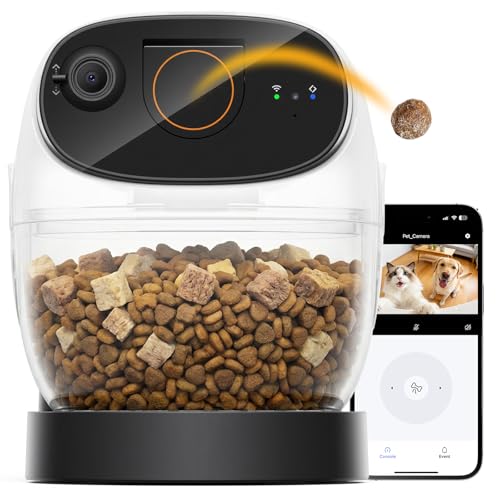
A treat camera is only as good as its dispenser. You want a mechanism that does not jam and can hold enough treats for a full workday. All three models here feature a 0.5 liter treat bin, which is adequate for small to medium kibble or treats. The recommended treat size is 7-15mm. Remote tossing via the phone app should be responsive. The TKENPRO models include a virtual companion feature that lets you schedule feed times and even record your voice to call your pet. The faroro model also supports scheduled feedings and voice recording. Look for a dispenser that allows you to adjust the number of treats per toss. Some models let you toss one treat at a time; others release a small handful. For training, single-toss is better. For general entertainment, a small handful works well.
If you are comparing treat cameras, the differences between treat cameras and standard pet cameras often come down to dispenser reliability. Choose a brand with a proven track record.
Video Quality and Night Vision
You want to see your pet clearly, even in low light. All three cameras offer 2K HD resolution, which is a step above 1080p. This extra detail helps you spot subtle behaviors, like a cat twitching its tail or a dog chewing on a toy. Night vision is essential for pets that are active after dark. Both TKENPRO models use infrared night vision to capture clear black-and-white footage. The faroro model also includes night vision. For a wider view, look for pan and tilt capabilities. The TKENPRO models offer 355 degree pan rotation, giving you a 360 degree view. The faroro model has a fixed 126 degree wide angle lens, which is good for a single room but not as flexible. If you have multiple pets or a large space, a panning camera is better.
For more on camera features, check out our guide to pet cameras with app control.
Smart Features and Connectivity
Modern treat cameras do more than just toss treats. They offer two-way audio so you can talk to your pet and hear them respond. Motion and bark alerts keep you informed. AI features can automatically create highlight videos of your pet’s best moments. The TKENPRO models include an AI-powered memory album that creates 60-second videos from motion-triggered clips. This feature requires a cloud subscription, but the local storage still records the raw footage. The faroro model focuses on basic motion alerts and two-way talk without AI extras. Dual-band WiFi (2.4GHz and 5GHz) ensures a stable connection, even if your home network is crowded. All three models support both bands. Voice control via Alexa or Google Assistant is available on the TKENPRO models, adding convenience for smart home users.
If you are torn between a treat camera and a standard pet camera, our comparison guide can help you decide.
Final Thoughts
Choosing the right treat camera with local storage depends on your budget and feature preferences. For pet parents who want the best video quality, AI highlights, and a responsive dispenser, the TKENPRO 2K Pet Camera Treat Dispenser is our top pick. It offers dual storage options, 360 degree viewing, and a virtual companion feature that keeps your pet engaged. If you are on a tighter budget but still want reliable local storage and remote treat tossing, the faroro 2K Pet Camera with Treat Dispenser delivers solid performance at a lower price point. Both models let you keep recordings without a monthly fee, giving you peace of mind and happy pets.
Related Guides
- Best Treat Cameras for Remote Pet Bonding in 2026
- Is the Furbo 360 Worth It?
- Furbo Dog Camera 360 Reviews
Frequently Asked Questions
Do treat cameras with local storage require a subscription?
No, you can use a microSD card (up to 128GB) for local storage without any subscription. The TKENPRO and faroro models all support this. Some advanced features, like AI-generated highlight videos, may require a cloud subscription, but basic recording and treat tossing work offline.
Can I use any treat size in these dispensers?
The recommended treat size is 7-15mm. Kibble or small training treats work best. Larger treats may jam the mechanism. Always check the product specifications before filling. The TKENPRO and faroro dispensers are designed for standard small pet treats.
How much local storage do I need for a treat camera?
For continuous 24/7 recording at 2K resolution, a 128GB card holds about 3-4 days of footage. If you use motion-triggered clips, the same card can last weeks or months. Choose a card with at least 64GB for comfortable use. All three models support up to 128GB. In 2026, prices for high-capacity microSD cards are very affordable.
Can I access my treat camera remotely without WiFi?
No, these cameras require a WiFi connection for remote viewing and treat tossing. They support both 2.4GHz and 5GHz networks. If you lose internet, local recording to the SD card still works, but you cannot access the live feed or toss treats until the connection is restored. For more on connectivity, see our Furbo dog camera reviews.


