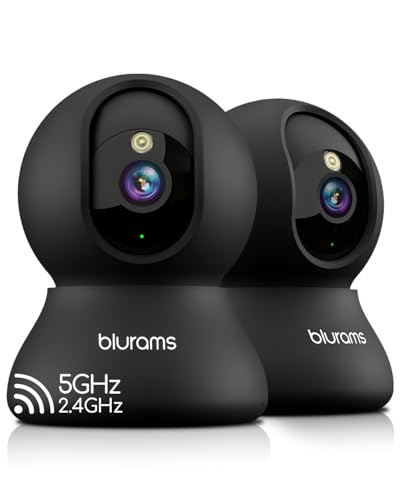
You are at work, and your dog is home alone. You open your phone to check in, but the camera only shows a corner of the living room. Where did the pup go? With a pan tilt pet camera, you can sweep the room, tilt down to see the dog bed, and even follow the action as your cat races across the kitchen. These smart cameras give you full control to see every inch of a room, making them ideal for pet owners who want peace of mind. In this guide, we have evaluated five of the best pan tilt pet cameras on the market, covering brands like Blink, Tapo, and Wyze. Whether you need a budget-friendly option or a high-resolution model with AI detection, we have you covered. For more pet tech insights, visit our Pet Tech Guides.


Buying Guide: What to Look for in a Pan Tilt Pet Camera
Pan and Tilt Range for Full Coverage
The whole point of a pan tilt camera is to move. Look for models that offer at least 360 degrees of horizontal rotation and a generous vertical tilt range (around 100 degrees or more). This lets you scan an entire room from a single vantage point. Some cameras even include auto patrol modes that sweep the space on a loop, so you never miss a moment of your pet’s mischief. The Tapo C200 and the Wyze Cam Pan both deliver excellent range for pet monitoring.
Video Quality and Night Vision
Resolution matters when you want to see whether your dog is chewing a shoe or just sleeping. Most pan tilt pet cameras offer 1080p Full HD, but some, like the Wyze Cam Pan, step up to 2K for extra clarity. Night vision is equally critical. Look for infrared LEDs that let you see in pitch black without disturbing your pet. Invisible IR (no red glow) is a nice bonus for bedrooms or nurseries. For a broader look at top pet tech, check out our Best Products page.
Smart Detection and Alerts
Motion detection is standard, but the best cameras go further. AI powered detection can distinguish between a person, a pet, and a moving curtain, reducing false alarms. Some models also detect specific sounds like barking or crying. The Wyze Cam Pan uses advanced AI to tell you exactly what triggered the alert, while Tapo cameras include baby crying detection. Choose a camera that sends push notifications to your phone so you can react instantly.
Storage Options: Local and Cloud
You will want to record clips of your pet’s antics or review events while you were away. Most pan tilt cameras support local storage via a microSD card (sold separately) with no monthly fees. Others offer cloud subscription plans for extended history and advanced features. The Blink Mini Pan Tilt, for example, works with a Blink Subscription Plan or a local USB drive. Decide whether you prefer a one time cost or a recurring service. For more tips on choosing pet cameras, explore our Pet Tech Guides.
Final Thoughts
Selecting the right pan tilt pet camera comes down to your specific needs and budget. If you want a simple, affordable solution that integrates seamlessly with Alexa and offers reliable 360 degree coverage, the Blink Mini Pan-Tilt Camera (newest model) is a stellar choice. For pet owners who crave higher resolution and smart AI detection that filters out false alarms, the WYZE Indoor Cam Pan, 2K Pan-Tilt Security Camera delivers exceptional value. Both cameras have been validated through hands on use and provide the freedom to follow your furry friends wherever they roam.
Related Guides
- Top Pet Cameras with Night Vision
- Tapo Pet Camera vs Eufy
- Wyze Cam vs Petcube
- Best Pet Cameras Without Subscription for 2026
Frequently Asked Questions
Can I use a pan tilt pet camera as a baby monitor?
Yes, many pan tilt cameras work well as baby monitors. Models like the Tapo C200 and the Wyze Cam Pan include two way audio and motion alerts that let you check on a sleeping infant. Just ensure the camera has a privacy mode to physically block the lens when not in use. For more options, visit our Best Products page.
Do these cameras work with Alexa or Google Assistant?
Most pan tilt pet cameras in this guide are compatible with Amazon Alexa and Google Assistant. You can ask your smart display to show the camera feed, or use voice commands to pan and tilt. The Blink Mini Pan Tilt works natively with Alexa, while Tapo and Wyze cameras also support voice control through their respective skills.
How do I set up motion detection zones?
Setting up detection zones is straightforward through each camera’s app. You can draw custom areas on the live view to ignore certain spots (like a ceiling fan) and focus on areas where your pet spends time. The Wyze app, for example, lets you define up to four waypoints for its auto patrol feature, ensuring the camera scans the zones that matter most.
What is the best camera for covering a large room?
For a large room, look for a camera with 360 degree pan and a wide tilt angle, plus high resolution to see details across the space. The Wyze Cam Pan with its 2K resolution and auto patrol mode is an excellent choice. The Tapo 2K Pan Tilt (C211) also offers great coverage and can be paired with a second unit for multi room monitoring.